
By Sumit Kumar. 15+ years in digital marketing and SEO, and has led marketing teams of up to 15 people. Updated November 2026.
If your job search looks like this, keep reading:
Scrolling LinkedIn, Naukri and Indeed every morning and seeing the same 40 jobs again
Hitting Easy Apply on 100 roles and hearing back from three
Sending the same CV everywhere because tailoring it each time takes an hour
Losing track of who you applied to, when, and which version of your CV they got
A Claude Code job search fixes most of that. Instead of hunting through job boards, you build a small personal job agent on your own laptop. It pulls fresh openings straight from company career pages, scores every role against your real CV, drafts a tailored application for the good ones, and keeps a tracker up to date.
You don't need to be a developer. If you can copy a command, edit a text file and describe what you want in plain English, you can do this. Claude Code writes the scripts. You make the decisions.
Who this guide is for
Marketers, SEOs, analysts, product and ops folks who are job hunting and tired of job boards
Freshers and career switchers who need to apply widely but smartly
Anyone targeting remote roles, global companies, or a move to the Gulf, Singapore or Europe
Developers too, though you'll move through the setup much faster
Key takeaways
Claude Code turns AI job search from "ask a chatbot" into a system that runs every day.
Pull jobs from company career pages and official APIs. Don't scrape LinkedIn or Naukri.
Score every job against your CV first, then only apply where you're a real fit.
Tailor honestly. Claude reorders and rewords your real experience. It never invents it.
You stay in control: nothing gets submitted without you reading it first.
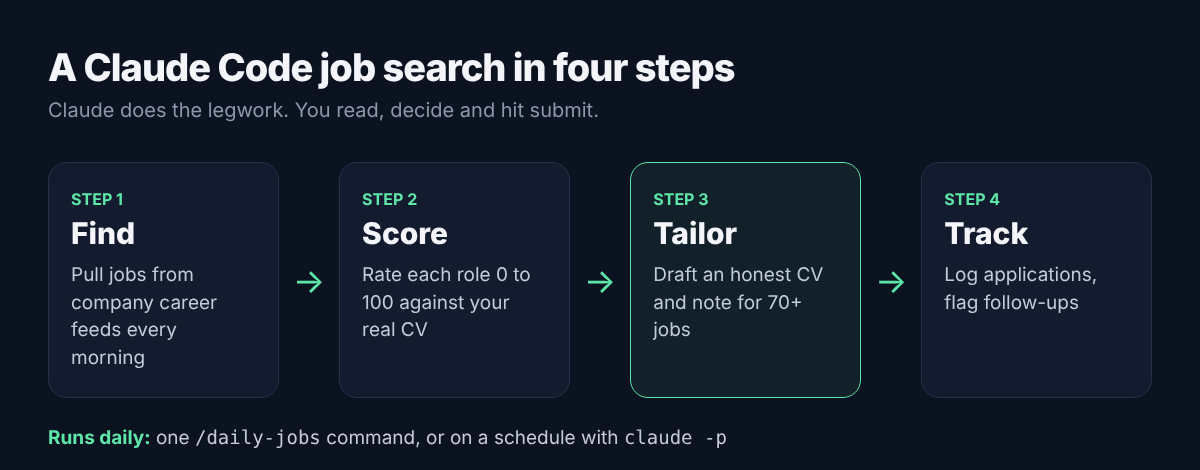
What is Claude Code, and why use it for a job search?
Claude Code is Anthropic's AI agent that works directly on your computer. You talk to it in plain English, and it can read and write files, run scripts and use the web. It runs in the terminal, and there's also a desktop app if you'd rather not touch a command line (Claude Code docs).
That "works on your computer" part is what makes it so useful for job hunting. A normal chat forgets your CV the moment you close the tab. Claude Code keeps everything in a folder: your CV, your target roles, every job it has found, every application you've sent. Each day it picks up where it left off.
Claude Code vs job boards vs AI job search tools
| Job boards (LinkedIn, Naukri, Indeed) | AI job search tools (auto-apply apps, CV matchers) | Claude Code job search | |
|---|---|---|---|
| Where jobs come from | Their own listings | Their own database | Any source you choose, including company career pages |
| How it matches you | Keywords and filters | Their algorithm | Your rules, written in plain English |
| Tailoring | None | Template-based | Per job, from your real CV |
| Your data | On their servers | On their servers | In a folder on your laptop |
| Cost | Free, or premium plans | Usually a monthly fee | Included with a paid Claude plan |
| Control | Low | Low to medium, some apply for you | Full: nothing goes out without you |
The biggest win is the source. Many companies list roles on their own careers page first, and smaller ones often don't pay to post on every job board. Checking those pages directly means you can spot roles early, often before the big applicant rush.
What you need before you start
A paid Claude plan. Claude Code needs a Pro, Max, Team, Enterprise or Console account; the free plan doesn't include it (Claude Code docs).
A Mac (macOS 13+), Windows 10 or newer, or Linux, with at least 4 GB of RAM
Your latest CV as a Word or PDF file
A list of 20 to 50 companies you'd love to work for
About an hour for the first setup. After that, 10 to 15 minutes a day.
Step 1: Install Claude Code and set up your job search folder
Install it
Open a terminal (Terminal on Mac, PowerShell on Windows) and paste the command for your system (official install guide):
# Mac, Linux or WSL
curl -fsSL https://claude.ai/install.sh | bash

# Windows PowerShell
irm https://claude.ai/install.ps1 | iex
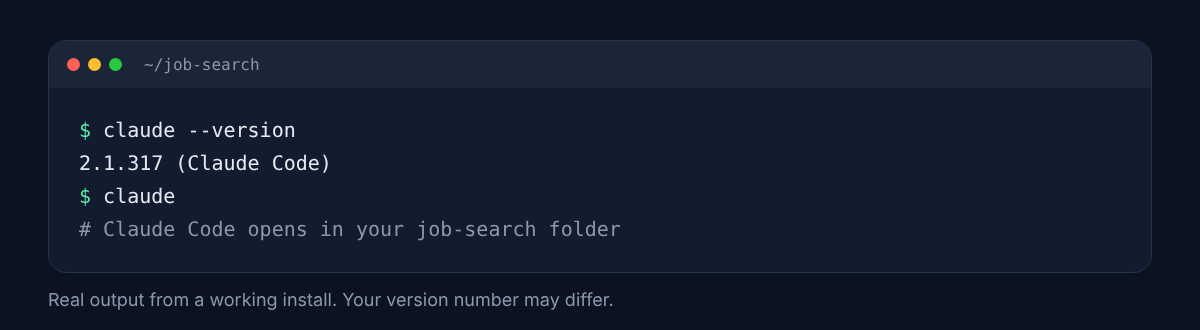
Close the terminal, open a new one and check it worked:
claude --versionYou should see a version number. Then type claude, press Enter and log in with your Claude account in the browser window that opens.
Not comfortable with the terminal? Download the Claude desktop app and use Claude Code from there instead. Everything in this guide works the same way.
Create your job search folder
Make one folder for your whole job hunt. This becomes your agent's memory.
Here's the layout:
job-search/
  CLAUDE.md          who you are and what you want
  companies.csv      your target companies
  fetch_jobs.py      the script that pulls jobs (Claude writes it)
  cv/
    master-cv.md     your full, honest CV
  jobs/
    new_jobs.csv     fresh matches from today
    shortlist.csv    jobs worth applying to, with scores
  applications/
    tracker.csv      everything you've applied to
  research/          company notes and interview prep
The easy way: put your CV file in the folder, open Claude Code there, and say:
Set up this folder as my job search workspace. Create the subfolders above, convert my CV in this folder into cv/master-cv.md without changing any facts, and start a CLAUDE.md file. Then interview me, one question at a time, about the roles I want.
Write your CLAUDE.md (the most important file)
Claude Code reads CLAUDE.md automatically every time you start it in that folder. Think of it as the brief you'd give a very good recruiter. Here's a real example for a marketing job seeker:
# My job search

## About me
- Current role: Senior Digital Marketing Executive, 5 years experience
- Based in: Noida, India. Open to remote, Gurugram, Bengaluru, Dubai
- Master CV: cv/master-cv.md (the only source of truth for my experience)

## Roles I want
- Titles: Digital Marketing Manager, SEO Manager, Growth Marketing Manager,
  Performance Marketing Manager
- Seniority: Manager or Senior Manager. Skip intern, junior, director, VP
- Must have: SEO or paid media as a core part of the role
- Nice to have: B2B SaaS, team lead experience, remote-friendly
- Deal breakers: pure sales targets, unpaid trials, commission-only pay

## My honest gaps
SQL, Tableau, programmatic (DV360)

## Rules for Claude
- Never invent experience, numbers, tools or job titles
- If a job needs a skill I don't have, say so plainly
- Never submit an application or send an email. Draft only
- Write in simple Indian English, no buzzwords
Two lines do most of the work here. "My honest gaps" stops Claude from overselling you. "Never submit an application" keeps you in charge of anything that leaves your laptop.
Build your target company list
Ask Claude Code to help you build companies.csv:
I'm a digital marketing manager in India open to remote and Dubai roles. Suggest 40 companies that hire for my profile, mixing Indian startups, global SaaS companies with India teams, and Gulf companies. For each, find their careers page and tell me which hiring system it uses (Greenhouse, Lever, Ashby, Workday or other). Save it as companies.csv.
Check the list yourself and delete anything you'd never join. A focused list of 30 companies you actually want beats 300 you don't.
Step 2: Pull fresh jobs from legit sources
This is where a Claude Code job search pulls ahead of scrolling job boards. Most companies run hiring through an applicant tracking system (ATS), and several popular ones publish open jobs through a free, public feed. No login, no scraping, no API key.
| Hiring system | Public feed for open jobs | You'll spot it in the careers URL |
|---|---|---|
| Greenhouse | boards-api.greenhouse.io/v1/boards/{company}/jobs | job-boards.greenhouse.io/{company} |
| Lever | api.lever.co/v0/postings/{company}?mode=json (Lever API guide) | jobs.lever.co/{company} |
| Ashby | api.ashbyhq.com/posting-api/job-board/{company} | jobs.ashbyhq.com/{company} |
You don't need to remember any of this. Just tell Claude Code:
Write a Python script called fetch_jobs.py. For each company in companies.csv, pull open jobs from its Greenhouse, Lever or Ashby public feed. Keep only jobs whose title matches my target roles in CLAUDE.md and whose location is remote, India or Dubai. Skip intern, junior, director and VP roles. Save matches to jobs/new_jobs.csv with the date, company, title, location and link. Print a short summary.
Claude Code will write the script, run it, and fix any errors on its own. Here's a version I tested, so you can see what you'll get:
"""Pull open jobs from company career pages (Greenhouse, Lever, Ashby
public feeds), keep the ones that match my targets, save to jobs/new_jobs.csv."""
import csv, json, urllib.request
from datetime import date

TITLES = ["marketing manager", "seo", "growth", "performance marketing"]
SKIP = ["intern", "junior", "director", "vp", "head of sales"]
PLACES = ["remote", "india", "noida", "gurugram", "bengaluru", "dubai", "anywhere"]

def get(url):
    with urllib.request.urlopen(url, timeout=20) as r:
        return json.load(r)

def greenhouse(board):
    data = get(f"https://boards-api.greenhouse.io/v1/boards/{board}/jobs")
    return [(j["title"], j["location"]["name"], j["absolute_url"]) for j in data["jobs"]]

def lever(board):
    data = get(f"https://api.lever.co/v0/postings/{board}?mode=json")
    return [(j["text"], j["categories"].get("location", ""), j["hostedUrl"]) for j in data]

def ashby(board):
    data = get(f"https://api.ashbyhq.com/posting-api/job-board/{board}")
    return [(j["title"], j.get("location", ""), j["jobUrl"]) for j in data["jobs"]]

SOURCES = {"greenhouse": greenhouse, "lever": lever, "ashby": ashby}

def keep(title, place):
    t, p = title.lower(), place.lower()
    return (any(k in t for k in TITLES) and not any(k in t for k in SKIP)
            and any(k in p for k in PLACES))

rows, seen = [], 0
for c in csv.DictReader(open("companies.csv")):
    try:
        jobs = SOURCES[c["ats"]](c["board"])
    except Exception as e:
        print(f"  ! {c['company']}: {e}")
        continue
    seen += len(jobs)
    matched = [j for j in jobs if keep(j[0], j[1])]
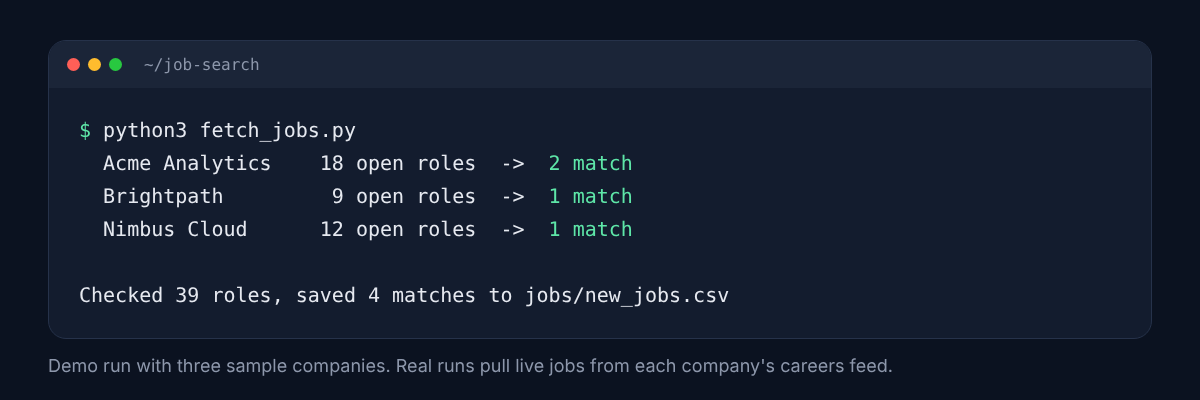
    print(f"  {c['company']:<16} {len(jobs):>3} open roles  ->  {len(matched)} match")
    rows += [[date.today(), c["company"], *j] for j in matched]

with open("jobs/new_jobs.csv", "w", newline="") as f:
    w = csv.writer(f)
    w.writerow(["found_on", "company", "title", "location", "url"])
    w.writerows(rows)
print(f"\nChecked {seen} roles, saved {len(rows)} matches to jobs/new_jobs.csv")
Here's a demo run with three sample companies. Out of 39 open roles, only four were worth a look:
What about LinkedIn, Naukri and Indeed?
Don't point Claude Code at them to scrape. Their terms of use don't allow automated scraping, and it can get your account restricted. That's a bad trade when your profile is your shop window.
Use them the legit way instead:
Job alerts: set up email alerts for your target titles on each board.
Save and paste: copy the job description text (or save the page as a PDF) into a
jobs/inbox/folder. Claude Code reads anything you drop there.Company names as leads: when a board shows you a good company, add it to
companies.csv. From then on, your script checks their careers page directly every day.
Companies that use Workday or their own site
Workday, SuccessFactors and custom careers pages don't have a simple public feed. For these, ask Claude Code to check the page with web search once a week, or just visit them yourself and drop the interesting job descriptions into jobs/inbox/.
Step 3: Score every job against your CV
A title match isn't a fit. "Digital Marketing Manager" can mean running a 10-person team at one company and posting on Instagram at another. So before you apply anywhere, let Claude Code read the full job description and score it against your real CV.
Run this in Claude Code each morning:
Read every job in jobs/new_jobs.csv. Open each link and read the full description. Score each job from 0 to 100 against cv/master-cv.md using this rubric:
Must-have skills I actually have: 40 points
Seniority and years of experience match: 20 points
Location or remote fit: 15 points
Industry and company fit from CLAUDE.md: 15 points
Nice-to-haves: 10 points For each job, list the top 3 reasons it fits, any skill gaps, and any red flags. Add jobs scoring 70 or above to jobs/shortlist.csv. Show me a table sorted by score.
You'll get something like this:
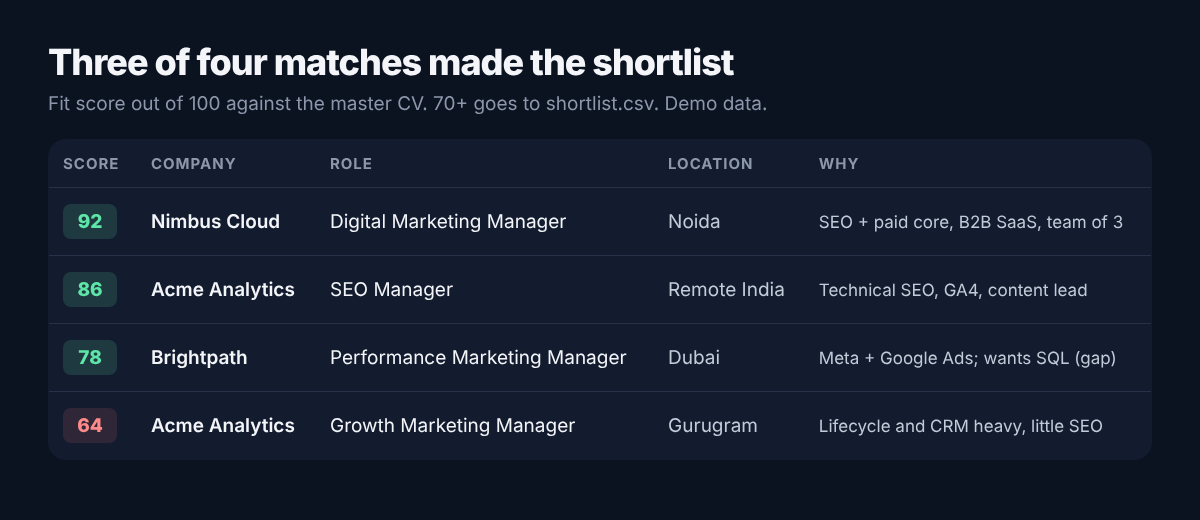
How to read the scores
85 and above: apply this week, with a tailored CV and a note to the hiring manager.
70 to 84: apply if the gaps are small or learnable. Mention how you'd close them.
Below 70: skip, even if the company is famous. A focused 10 applications beat a scattered 100.
Red flags Claude Code can catch for you
Ask it to flag these in every job description:
"Manager" title but no team, no budget and a junior salary range
Five different jobs rolled into one (SEO + design + sales + video editing)
Unpaid assignments that look like real client work
The same role reposted again and again over months
Vague company details, no website, or a personal email address for applications
That last one matters. Fake job offers and "pay a registration fee" scams are common, especially for remote and Gulf roles. Never pay to apply for a job.
Step 4: Tailor your CV and cover note for each job, honestly
Tailoring is where most people give up, because it takes too long. With Claude Code it takes minutes, and because your master CV lives in the folder, it can only work with facts you've already confirmed.
For the top job in jobs/shortlist.csv, create a folder in applications/ named after the company. Inside it:
A tailored CV based only on cv/master-cv.md. Reorder bullets so the most relevant experience comes first, mirror the job description's wording where it's true for me, and cut anything irrelevant. Keep it to 2 pages. Save as a Word file.
A 150-word cover note for the hiring manager that mentions one specific thing about the company.
A short list of every change you made versus my master CV, so I can check it. Do not add any skill, number, tool or title that isn't in my master CV.
That third file is your safety net. Read it every time. If Claude has stretched a claim, fix it before you send anything.
What good tailoring looks like
| Master CV says | Job asks for | Tailored CV says |
|---|---|---|
| Managed Google and Meta Ads budgets for 6 clients | Performance marketing across paid channels | Ran paid campaigns across Google and Meta Ads for 6 clients |
| Did keyword research and on-page SEO for a SaaS site | B2B SaaS SEO experience | Led keyword research and on-page SEO for a B2B SaaS website |
| Built monthly reports in Looker Studio | Data-driven marketing, dashboarding | Built monthly Looker Studio dashboards to track campaign results |
Same facts, clearer match. That's the whole trick. What you never do is turn "supported the SEO lead" into "led SEO strategy". Recruiters spot it in the first interview, and it costs you the offer.
Beat the ATS without keyword stuffing
Most companies run CVs through an ATS before a person sees them. Ask Claude Code:
Compare my tailored CV with the job description. List the important keywords and skills from the job, mark which ones my CV already shows, and which ones I have but didn't mention. Don't add ones I don't have.
Also ask for a simple layout: one column, standard headings (Experience, Skills, Education), no tables or text boxes. Fancy designs often break when an ATS reads them.
A note on referrals
A referral usually beats a cold application. For your top five companies, ask Claude Code to draft a short, polite LinkedIn message to an employee you're already connected to or share something in common with. You send it yourself.
Step 5: Track applications and run it every day on autopilot
Keep one simple tracker
Ask Claude Code to create applications/tracker.csv with these columns, and to add a row every time you tell it you've applied:
| Column | Example |
|---|---|
| Company | Nimbus Cloud |
| Role | Digital Marketing Manager |
| Fit score | 88 |
| Applied on | 2026-11-03 |
| Source | Careers page |
| CV version | applications/nimbus-cloud/cv.docx |
| Contact | Hiring manager name, if known |
| Status | Applied, Screening, Interview, Offer, Rejected |
| Follow up on | 2026-11-10 |
| Notes | Referred by college senior |
Then once a week:
Look at applications/tracker.csv. Which applications are past their follow-up date with no reply? Draft a short, polite follow-up for each one. Also tell me my response rate by source and by fit score band.
After a few weeks, that last question shows you what's working. If careers-page applications get replies and Easy Apply ones don't, you know where to spend your time.
Turn your morning routine into one command
Claude Code supports skills: saved instructions you can run by name. Create a file at .claude/skills/daily-jobs/SKILL.md in your job search folder:
---
name: daily-jobs
description: My daily job search routine
---
1. Run python3 fetch_jobs.py
2. Score every new job in jobs/new_jobs.csv against cv/master-cv.md
   using the rubric in CLAUDE.md. Skip jobs already in shortlist.csv
3. Add jobs scoring 70+ to jobs/shortlist.csv
4. Check applications/tracker.csv for follow-ups due today
5. Write a short summary to daily-summary.md: new matches, top 3 jobs
   with reasons, follow-ups due
Now you just open Claude Code in the folder and type /daily-jobs.
Schedule it to run without you
Claude Code has a non-interactive mode: claude -p runs a prompt and exits, which makes it easy to schedule (headless mode docs). On a Mac or Linux laptop, add this to your crontab (crontab -e) to run every weekday at 8:30 am:
30 8 * * 1-5 cd ~/job-search && claude -p "/daily-jobs" --allowedTools "Bash(python3 fetch_jobs.py),Read,Write,Edit,WebFetch" >> daily.log 2>&1On Windows, set up the same command in Task Scheduler. Your laptop needs to be on at that time, so pick an hour when it usually is.
The --allowedTools part matters. It lets Claude Code run your script, read job pages and update your files without asking each time, but nothing else. It still can't send emails or submit applications, because you never gave it a way to.
Your morning now starts with daily-summary.md: a short list of fresh, scored jobs and the follow-ups due today. Ten minutes over chai, and you know exactly what to do.
Step 6: Research companies and prep for interviews
Once you get a call back, Claude Code becomes your prep partner. Everything it learns goes into research/, so you're never starting from scratch.
One-page company brief
Research Nimbus Cloud using web search. Write research/nimbus-cloud.md with: what they sell and to whom, recent news from the last 6 months, who leads marketing, their main competitors, how they show up in Google and on LinkedIn, and 3 smart questions I could ask in the interview. Link every source.
For marketing roles, add one more line: "Do a quick audit of their website's SEO and their last 10 LinkedIn posts, and give me 3 ideas I could bring up." Walking into an interview with a real idea for their business sets you apart from most candidates.
Practice the interview
Based on the job description and my CV, list the 10 questions I'm most likely to be asked, including tough ones about my gaps in SQL and Tableau. Then interview me one question at a time. After each answer, tell me what was strong, what was weak, and how to tighten it using the STAR format.
Practise out loud. Type your answers the first time, then say them without reading.
Salary research
Ask Claude Code to look up salary ranges for the role and city from public sources, and to show where each number came from. Treat the result as a rough range, not a fact. Salary data online is patchy, especially for Indian and Gulf markets, so cross-check with people in your network.
Mistakes to avoid in an AI job search
Auto-applying to everything. Recruiters can spot copy-paste applications instantly, and spray-and-pray hurts your reply rate. Use AI to apply better, not more.
Letting AI invent experience. One made-up tool or number can sink you in a background check or the first technical round.
Scraping job boards. It breaks their terms and puts your account at risk. Use career pages, public feeds and job alerts.
Skipping the human check. Read every CV and cover note before it goes out. You're the one signing it.
Uploading sensitive documents. Keep your Aadhaar, PAN, passport and bank details out of the folder. Your CV and job descriptions are all Claude needs.
Building forever, applying never. Your system only needs to be good enough. Get the first version running in an afternoon and start applying the same week.
Your first week plan
Day 1: install Claude Code, create the folder, write CLAUDE.md and convert your CV.
Day 2: build
companies.csvwith 30 to 50 target companies.Day 3: have Claude Code write and run
fetch_jobs.py. Score your first batch.Day 4: tailor and send applications for your top 3 to 5 jobs.
Day 5: set up the tracker and the
/daily-jobsskill.Weekend: schedule the daily run, research your top companies, and practise one mock interview.
FAQ
Can Claude Code apply to jobs for me? It can fill in forms through a browser if you set that up, but I don't recommend it. Auto-applying lowers quality, may break a job site's terms, and takes away your final check. Let it find, score and draft. You click submit.
Is Claude Code free? No. It needs a paid Claude plan (Pro, Max, Team or Enterprise) or a Console account with API credits. The free plan doesn't include it.
Do I need to know coding? No. You describe what you want in plain English and Claude Code writes and runs the scripts. Knowing how to open a folder and copy a command is enough, and the desktop app makes it even easier.
Is it safe to give Claude Code my CV? Your files stay in a folder on your laptop, and Claude reads them to do the task. Don't put ID documents, bank details or passwords in that folder. Check Anthropic's privacy settings for your plan if you want to control how your data is used.
Will this work for jobs in India and the Gulf? Yes. Plenty of Indian startups and global companies hiring in India, the UAE and Saudi Arabia use Greenhouse, Lever or Ashby. For companies that only post on Naukri, Bayt or LinkedIn, use job alerts and paste the descriptions into your inbox folder.
How is this different from ChatGPT or Claude chat? A chat forgets your context and can't run anything on a schedule. Claude Code works inside a folder on your computer, remembers your profile through CLAUDE.md, runs scripts, saves files and can repeat the whole routine every day.
The bottom line
A Claude Code job search doesn't replace networking, a strong CV or interview practice. It removes the boring parts: checking 30 careers pages, re-reading the same job ads, rewriting the same CV and forgetting to follow up. That frees you up for the work that actually gets you hired.
Start small. One folder, one CLAUDE.md, one script. You'll have your first scored shortlist by tonight.
Sources
Keyword volumes: Ubersuggest, US database, pulled 3 November 2026